
The Zoom for Outlook Plugin disappeared
Check for Updates - Uninstall and reinstall the Outlook Apps and ensure the Microsoft Auto Update app is also installed
Nothing happens when I try to add a Zoom Meeting to a new event
https://support.zoom.com/hc/en/article?id=zm_kb&sysparm_article=KB0066793
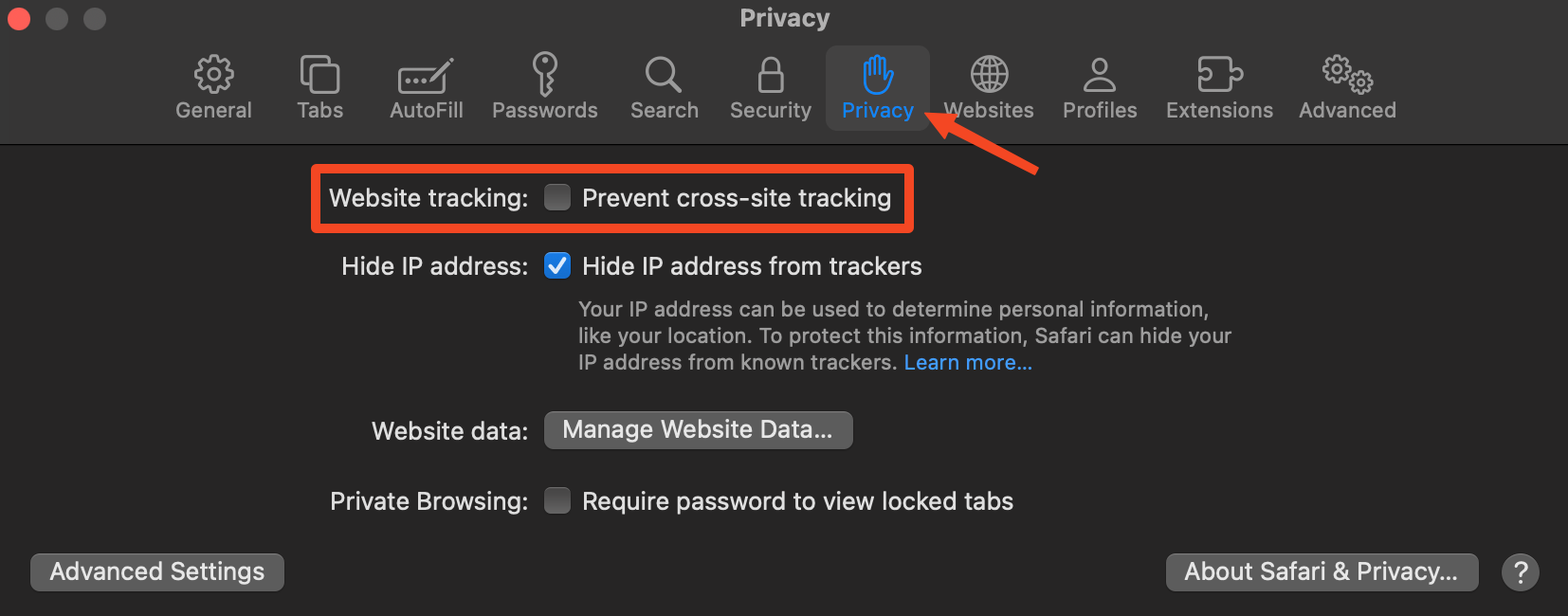
On Safari
Open Settings > Privacy > Uncheck “Prevent Cross-site tracking”
On Mac
-
Check for any updates available for the app. If using Mosyle, you can check the “Self Service” app and look for an “Update” button under Outlook
-
Open outlook, go to the Zoom plugin settings and sign out. Quit out of Outlook
-
In finder, go to folder:
~/Library/Containers/com.Microsoft.Outlook/Data/Library/Application Support/Microsoft/Office/16.0/-
Delete the following folders:
-
Wef -
WebServiceCache
-
-
-
Go to this folder:
~/Library/Containers/com.microsoft.Outlook/Data/Library/Caches-
Delete com.microsoft.Outlook
-
-
Empty your trash
-
Relaunch Outlook, open the Zoom Plugin app and check to see that you are able to add a calendar event with the Zoom Meeting set properly
If that doesn’t fix the issues - try the following:
-
Switch to legacy outlook and make an event and add a Zoom link, it should work
-
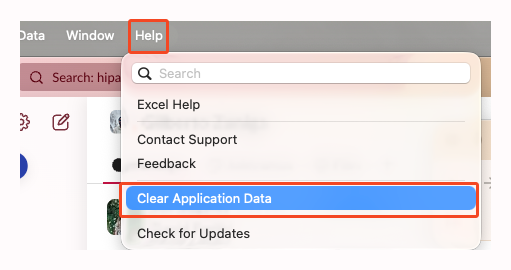
Open Outlook - in the mac Menu bar click Help →Clear Application Data →Experimental Features →Clear and restart
-
Switch back to regular outlook - try to make an event a few times if it fails the first time, eventually it should work.
-
If you still run into issues, you should try to re-delete the folders of the cache above
-